
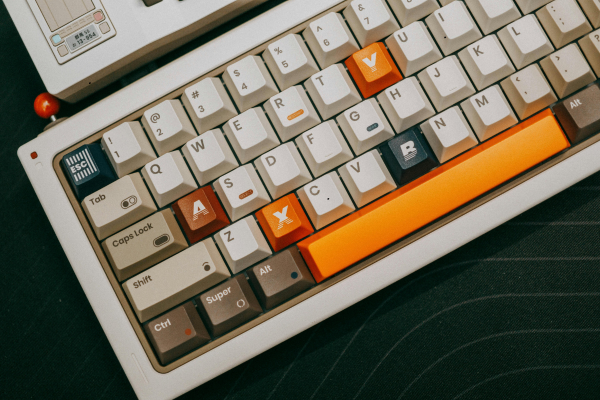
Which keycap profile should you actually buy? It’s one of the most common questions from anyone new to customizing a keyboard, and it’s genuinely confusing at first, since half the terminology (SA, DSA, XDA, MDA) sounds like it was invented specifically to intimidate beginners. It wasn’t, these are just naming conventions that stuck over the decades, but understanding what they actually mean makes shopping for keycaps dramatically easier.
Profile refers to the height and shape of your keycaps, and it affects typing feel, sound, and how your fingers navigate the board just as much as switch choice does, arguably more for some people.
Sculpted vs. Uniform: The Big Divide
Before getting into individual profiles, there’s one core distinction worth understanding. Sculpted profiles have a different height and angle for each row, mimicking the natural curve your fingers make as they reach across the keyboard. Uniform profiles keep every row the same height and shape, meaning a key from the top row and a key from the bottom row are physically interchangeable.
Sculpted profiles (Cherry, OEM, SA) tend to feel more intuitive for touch typists, since the row height itself helps guide your fingers to the right spot without looking. Uniform profiles (DSA, XDA) have a cleaner, more minimalist look and offer more flexibility if you like rearranging keycap legends or building non-standard layouts, but some people find the flat surface makes fast typing feel slightly less precise at first.
OEM: The One You’ve Probably Already Used
Height: Medium (roughly 11.9mm at its tallest row)
Shape: Sculpted, cylindrical tops
Sound: Slightly higher-pitched, more “clacky” due to a larger internal air cavity
If you’ve used a pre-built keyboard from any major brand, Keychron, Logitech, Razer, Corsair, there’s a good chance you’ve already typed on OEM profile keycaps without knowing the name. It’s the default, workhorse profile of the entire industry, which makes it comfortable and familiar but also the least distinctive option if you’re trying to change up your keyboard’s feel.
Cherry: The Enthusiast’s Go-To
Height: Low-medium (roughly 9.4mm), about 1-2mm shorter than OEM
Shape: Sculpted, similar cylindrical shape to OEM but with a lower center of gravity
Sound: Deeper, more muted due to the smaller internal cavity
Cherry is often described as the “upgrade” from OEM for exactly this reason. The reduced height means less finger travel per keystroke and, for a lot of people, noticeably less wrist strain over long typing sessions. It’s also associated with a deeper, more controlled sound than OEM’s slightly brighter clack. One quirk worth knowing: Cherry profile can occasionally cause interference issues on keyboards with north-facing switch orientation, where the lower keycap wall can physically contact the switch housing before fully bottoming out.
SA: Tall, Retro, and Not for Everyone
Height: Very tall (roughly 16.5mm), among the tallest commercially available profiles
Shape: Sculpted, deeply concave “spherical” tops
Sound: Deep, resonant, often described as the most dramatic “thock” of any common profile
SA keycaps have a distinctly vintage typewriter look, and the height creates a large internal cavity that acts almost like an echo chamber when you type. It’s a favorite for people building a retro-styled aesthetic setup, but the extra height genuinely does require more finger travel per keystroke, which can be tiring for long typing sessions or fast-paced gaming without a wrist rest.
DSA and XDA: The Uniform Options
DSA is short and spherical, with every row at the exact same low height (around 7.6mm). It produces a quieter, lower-pitched sound thanks to its compact internal cavity, and its flat, uniform look appeals to people who want a clean, modern aesthetic or who like rearranging keycaps across a custom layout.
XDA sits slightly taller than DSA with a flatter top surface and a bit more surface area per key. It’s become especially popular for keycap sets with large printed artwork or icons, since the flat top acts like a small canvas. Sound-wise, it lands close to Cherry profile, just a touch lower in pitch.
Both uniform profiles trade a bit of finger-guidance for aesthetic flexibility, worth knowing if you’re coming from a sculpted profile and wondering why your typing feels slightly different at first.
Watch a Direct Comparison
Specs on a page are useful, but seeing these profiles side by side, and hearing the sound difference in particular, makes the distinctions click much faster. This video compares three of the most common profiles directly:
A Quick Compatibility Note
Nearly all of these profiles are compatible with standard MX-style switch stems, so switching profiles doesn’t usually require changing anything else about your build. The one thing worth double-checking is north-facing switch interference with Cherry profile specifically, and general layout compatibility (right shift size, bottom row key widths) regardless of which profile you choose, since layouts vary more between keyboard brands than profiles do.
Which One Should You Actually Pick?
If you’re upgrading from stock keycaps for the first time and want the most universally comfortable option, Cherry is the safest recommendation for most people, it’s low enough to reduce fatigue while still offering the row-height guidance that helps with touch typing. If you’re chasing a specific aesthetic, whether that’s the vintage look of SA or the clean, artwork-friendly look of XDA, let that visual goal guide your decision more than any objective “best” profile, since a lot of this genuinely comes down to personal preference once you’re past the basics.
Once you’ve settled on a profile, material becomes the next decision. Our PBT vs ABS comparison covers how that choice interacts with profile to shape your final sound and feel, and if you’re specifically hunting for a budget-friendly way to try a new profile, our budget PBT keycap roundup is worth checking before committing to a pricier premium set.