
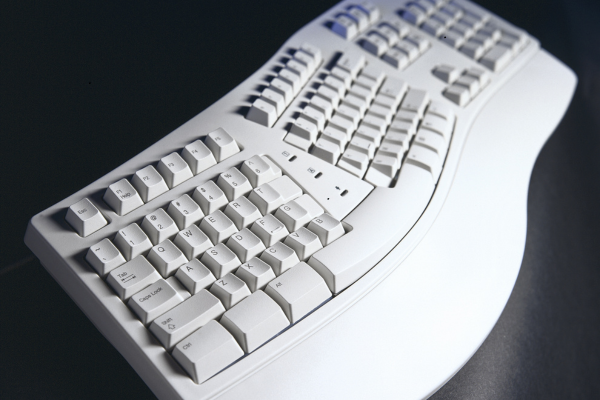
Wrist and forearm discomfort from typing doesn’t usually show up on day one, it builds slowly over months of the same slightly-wrong hand position, and by the time it’s noticeable, it’s already become a habit your body has adapted around. Ergonomic keyboards exist specifically to interrupt that pattern before it becomes a real problem, and understanding which type actually addresses your specific posture issue matters more than picking whatever looks the most interesting.
Start With What Your Hands Are Actually Doing
Before buying anything, it’s worth a simple self-check: rest your hands naturally on a flat surface, not a keyboard, just relaxed on a table. Do your wrists sit straight, or do they angle inward toward each other? Most people’s natural resting position has some inward angle, which is exactly the opposite of what a standard, unsplit keyboard forces you into, hands pulled together at the centerline, wrists bent outward to compensate. This inward-vs-outward mismatch, called ulnar deviation, is a big part of what causes discomfort over long typing sessions.
This test also tells you which category of ergonomic keyboard is worth considering. If your wrists naturally sit close to straight with just a slight curve, a fixed curved or wave-shaped keyboard (one continuous piece, not actually split into two halves) can provide meaningful relief with almost no adjustment period. If your hands naturally want to sit much farther apart than a standard keyboard allows, you’re a better candidate for a true split design, where the two halves separate completely and can be positioned at whatever width and angle actually matches your body.
Fixed Curved Keyboards: The Low-Commitment Option
Keyboards like the Logitech Ergo K860 keep a familiar, standard key layout and spacing but curve the keyset gently and add an integrated palm rest. The appeal here is adaptation cost, since the key positions haven’t fundamentally changed, most people adjust within a few days rather than weeks. This makes it a reasonable first step if you’re not sure whether ergonomic keyboards are worth the investment, or if a full split keyboard feels like too big a change to commit to right away.
The tradeoff is that fixed curved keyboards provide real but modest ergonomic benefit compared to a true split design, since you can’t actually change the spacing or angle between your hands, you’re locked into whatever curve the manufacturer chose.
True Split Keyboards: More Adjustment, More Payoff
Fully split keyboards, where the two halves are entirely separate pieces connected by a cable, let you position each hand at genuine shoulder width and often add tenting (an upward tilt toward the center) that keeps your palms facing more inward rather than flat and pronated. This is a substantially bigger ergonomic intervention than a fixed curve, and for people with genuine ongoing discomfort rather than mild fatigue, it tends to be the more effective long-term fix.
The honest tradeoff is adaptation time. Expect somewhere between one and three weeks before typing speed and accuracy return to normal, sometimes longer if you’re also adjusting to an unfamiliar key stagger or thumb cluster layout. This isn’t a same-day swap, and going in with that expectation matters, a lot of people abandon split keyboards in the first few frustrating days without realizing the adjustment curve is normal and temporary.
Contoured (Bowl-Shaped) Keyboards: The Deep End
A smaller category, keyboards like the Kinesis Advantage line, uses concave, bowl-shaped key wells where each key sits at a different height and depth matching the natural curl of your fingers, rather than a flat plane. This reduces finger travel distance more dramatically than either fixed curved or standard split designs. It’s also the biggest adjustment curve of any ergonomic category, genuinely not a keyboard to buy expecting to type normally the next day.
This category makes the most sense for people who type many hours daily, developers and writers in particular, and who are willing to invest real time in relearning muscle memory in exchange for the most significant ergonomic benefit available.
Watching Someone Work Through the Full Range
Reading specs doesn’t convey the actual adjustment experience or day-to-day feel nearly as well as watching someone who’s genuinely tried multiple categories talk through the tradeoffs. This video covers a broad range of ergonomic keyboards and the reasoning behind picking one over another:
Switch Type Matters Less Than the Shape Does
It’s worth clearing up a common misconception: ergonomic refers to the physical shape and layout of the keyboard, while mechanical vs. membrane refers to the underlying switch technology, and these are independent decisions. You can find genuinely ergonomic split or curved keyboards using either mechanical switches (offering more tactile precision and, on hot-swappable models, the customization we’ve covered in our switch guides) or quiet membrane/scissor switches, which some people prefer specifically for shared office noise reasons, something we covered in our quietest keyboards for shared workspaces article. Neither switch type inherently makes a keyboard more or less ergonomic, the shape is what does that work.
Setting Realistic Expectations
An ergonomic keyboard genuinely can reduce strain from typing posture specifically, but it’s not a cure-all for every kind of discomfort. If pain stems from sitting still for hours without breaks, monitor height, chair setup, or an existing repetitive strain injury that’s already progressed, a new keyboard addresses only one piece of a larger picture. For persistent or worsening symptoms, it’s worth talking to a doctor or physical therapist rather than assuming a keyboard purchase alone will resolve it, hardware changes work best as part of a broader approach to desk ergonomics, not a standalone fix.